Minesweeper
Play Minesweeper free in your browser. Reveal tiles, flag hidden mines, and use number clues to clear the board without detonating a single mine. The classic logic puzzle game.
How to Play
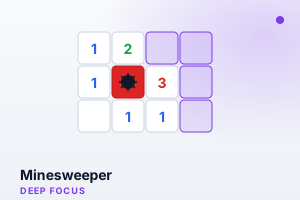
- Click any tile to reveal it. Numbers show how many mines are in the 8 surrounding tiles.
- Right-click or long-press a tile to place a flag where you think a mine is hidden.
- Use the number clues to deduce which tiles are safe and which contain mines.
- Reveal all safe tiles without clicking on a mine to win the game.
- The timer tracks how fast you can solve the puzzle — try to beat your best time.
Features
- Classic Minesweeper with the familiar grid-based puzzle format
- Real-time mine counter showing remaining unflagged mines
- Built-in timer to track your solving speed
- Satisfying cascade reveal when clicking empty areas
- One-click new game to start a fresh board instantly
- Chord-click revealed numbers to open their neighbours; per-difficulty best times
Tips & Strategies
- Start by clicking near the center — corner and edge clicks are more likely to hit mines early.
- When a number matches the count of adjacent flags, all other adjacent tiles are safe to reveal.
- Look for patterns: a '1' next to a single unrevealed tile means that tile is definitely a mine.
- Use flags liberally — marking known mines helps you see which remaining tiles are safe.
- If stuck, look for tiles where the numbers overlap and eliminate possibilities logically.
- When a number's flags match, click the number itself to sweep the rest.
About This Game
Minesweeper is the iconic logic puzzle that shipped on a generation of office computers. Numbered tiles tell you how many mines hide among their neighbours; from those clues you deduce which squares are safe and flag the ones that aren't. There is no luck once the board opens up — only careful reasoning. That blend of tension and deduction makes it an excellent deep-focus break, and a built-in timer turns each clear into a personal speed challenge worth chasing.
Frequently Asked Questions
- What do the numbers mean?
- A number shows how many mines touch that tile across its eight neighbours. A '3' means exactly three of the surrounding squares are mined.
- How do I flag a mine?
- Right-click a tile on desktop, or long-press it on touchscreens. Flags mark suspected mines so you don't click them by accident.
- Is the first click ever a mine?
- No. The board is arranged so your opening click is always safe, which is why it usually reveals a large cleared area.
- Is winning down to luck?
- Mostly no. After the first reveal, the numbers let you deduce safe tiles logically. Only rare configurations force a genuine guess.